Monday, August 15, 2005

PdaReach for Palm Zires, Tungstens, Treos


If you would like to display and control your Palm Zire, Tungsten or Treo from your computer have I got a solution for you! PdaReach is only $24 and it's worth every penny! I just learned about it through a Palm Education Training Coordinator bulletin board.

I have used a Margi Presenter to Go to connect my Palm handheld to a projector. While it works great with my m130 and Tungsten E, the Margi PTG is incompatible with my Zire 72. Here is a very economical solution that works!

"Ever dream of controlling your Palm Handheld directly from your PC? With PdaReach now it is possible! All you need to do is just connect your PDA to your PC with the HotSync cable, and PdaReach will take care of the rest to bring you the what-you-see-is-what-you-get experience live on the PC monitor."

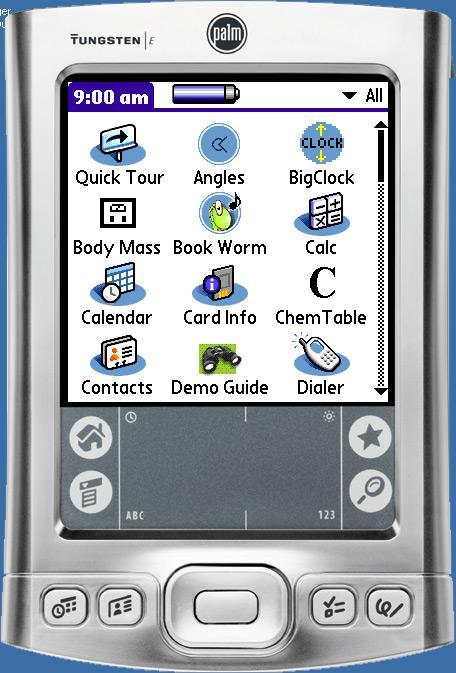
Much easier to use than the Palm Emulator! The photo is a screen capture of my Tungsten E. Check out the PdaReach website at: http://www.junefabrics.com/pdareach/index.php

Saturday, August 13, 2005

PrimoPDF-- Free PDF conversion software

Although I couldn't find the relevant statistics to back me up, I think it's safe to say that almost every computer has the free Adobe Acrobat Reader installed. Far fewer computers have the means to convert documents to PDF (portable document format) using Adobe Acrobat or some other software. (Those of you who understand PDF may now skip to the next paragraph.) PDF allows computer users to exchange documents electronically even if they don't have the same software. So if I have Microsoft Word and you don't, I can't email you a Word document because you wouldn't be able to open it. But, I can convert my Word document to a PDF and then you'd be able to open it, see it and print it on your computer, assuming your computer is one of the 99.9% that have Acrobat Reader.

I have Adobe Acrobat at work and I LOVE it! It has all the "bells and whistles" that I need and use, and other features that I may never even understand let alone use. But for many people Adobe Acrobat is overkill. It's like buying a Ferrari that you can only drive 65 on the Interstate. I've discovered a wonderful FREE PDF converter-- PrimoPDF at: http://primopdf.com

Here's a promotional blurb from their website:

-FREE PDF Converter - not a trial version.
-Print to PDF from virtually any application.
-Create PDF output optmized for print, screen, ebook, or prepress.
-No annoying pop-up ads, no registration requirement - no catch!

The site features a support forum, and a user manual that may be viewed online or downloaded as a-- what else-- PDF.


Friday, August 12, 2005

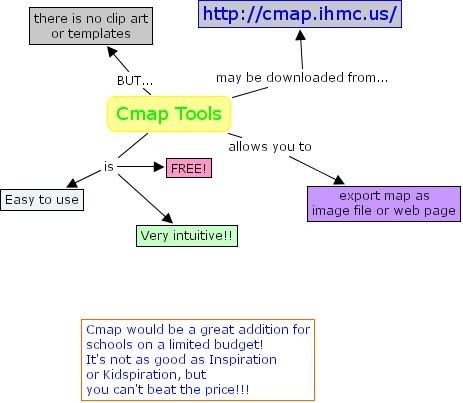
My first Cmap

MyPyramid software for handheld computers


SkyscapeOnHand.com has made their MyPyramid food guidance software for handheld computers available for FREE from their website: http://www.skyscapeonhand.com/eStore/FoodGuide.aspx
The software puts the newly revised USDA food pyramid into the palm of your hand!
"Receive personalized guidance on what and how much food to eat from each food group by simply entering your age, gender and physical activity level."
It's possible to extract the files and to install them using the Palm Installer by following the instructions posted at--
www.skyscapeonhand.com/Support/ShowFAQ.aspx?kbid=175&cid=11

You may also use MyPyramid on the USDA website: http://mypyramid.gov

FREE concept mapping software

While participating in a unitedstreaming "webinar" I learned of CMAP concept mapping software. Here is the description of their software from their website:
"The CmapTools program empowers users to construct, navigate, share and criticize knowledge models represented as concept maps. It allows users to, among many other features, construct their Cmaps in their personal computer, share them on servers (CmapServers) anywhere on the Internet, link their Cmaps to other Cmaps on servers, automatically create web pages of their concept maps on servers, edit their maps synchronously (at the same time) with other users on the Internet, and search the web for information relevant to a concept map."

The software is FREE for educational or commercial use and it is available for Windows, OSX, and Linux. I've just downloaded the software this morning and I'll try to give you my first impressions in a future post.

The Cmap URL is: http://cmap.ihmc.us/

Wednesday, August 10, 2005

Google Earth-- must have software!


I am blown away by Google Earth! (http://earth.google.com/) Google calls it "a 3D interface to the planet."

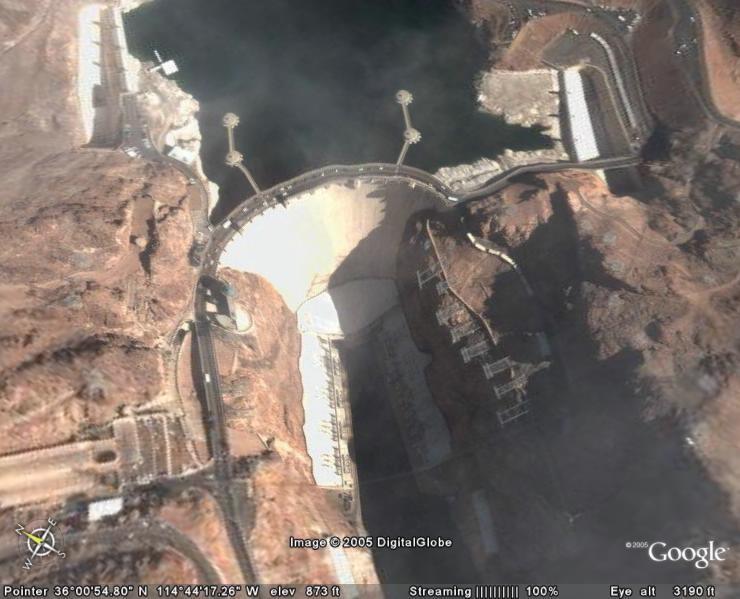
This FREE software requires a high speed Internet connection. Using satellite imagery, Google Earth allows the user to zoom in on virtually any location on the planet. You can type in a city name, a zip code, or address and fly away! Here's a picture I just took of the Hoover Dam.

I highly recommend the Google Earth Community bulletin board (http://bbs.keyhole.com/entrance.php?Cat=0) for all new users. You can download placemarks to famous world landmarks and share ideas for integrating this software in your classroom with other educators (and some very savvy students).

Sorry Mac users, but Google Earth is not available for your computer yet, but Google says they're working on it.

Wednesday, April 06, 2005

Share this site with a K-1 teacher

Starfall.com is the site "Where children have fun learning to read" and K-1 teachers have fun downloading and printing the many outstanding FREE resources!

There are many online activities for students and lots of printables for teachers and parents. You may also order classroom quantities of their printed materials for only 50 cents per copy with no shipping charges and free Starfall pencils for your students.

Please share this site with your colleagues who teach Kindergarten and first grade.