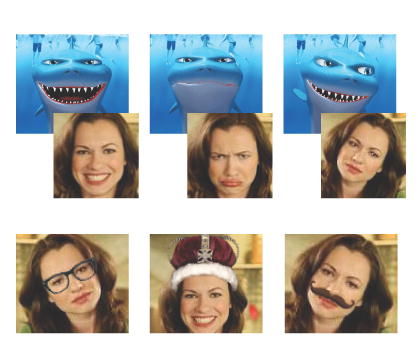
There are some really fun websites for teachers that will allow you to create dynamic images like these at www.hetemeel.com. (Caution: I wouldn't recommend sending your students there because others have saved some rather "adult" captions on the website)
You can capture a snapshot of a web page (like this one) using the "Share in Hello" icon found on the Internet Explorer toolbar. Click the picture above to enlarge it to full screen and the icon will be easier to see. Then you can send the screenshot to your Blogger blog instantly with the "BloggerBot." You can even add a caption.
You'll need the free Picasa software (which I blogged about here) and hello software from the good folks at Google.
Do you see the little podcast icon at the bottom of every blog post? (It looks like this )
Clicking the link next to it will automatically create and then play a recording of a female voice reading the words in the post.
Thanks (again) to Vicki A. Davis and her Cool Cat Teacher Blog, I learned about Talkr.com, the free website that makes this possible. Vicki has a great Talkr "how-to" article posted on her blog here.
Even more amazing, is that Talkr will generate a "feed" that will enable users to download each audio blog post to their iPod!
The computer generated voice is no replacement for a real live human, but it's not bad! The text-to-speech synthesis has improved tremendously in the past few years. (Check out this demo at the AT&T Labs)
I'll be spending more time at the Talkr website to see what else I can learn about this cool new resource.
While perusing my Bloglines feeds this morning, I came across this "viral video" of a girl who recently went through a breakup. She recorded the video using a Logitech webcam, and used some amazing animated effects that were generated with the Logitech Video Effects software. I had to go to Logitech's website to check it out for myself. What I saw blew me away!
Here's another demo from the viral video girl that shows the capabilities of the software.
I swear a little animated light bulb immediately appeared over my head! Students can create a story, and then videotape themselves as the actual character in the story! There are dozens of avatars and "face accessories" that can be added to videos recorded with the compatible Logitech webcams. The software is free, and so are the avatars and face accessories-- with a webcam that sells for under a hundred bucks!
We placed an order for one today. Watch for a sample video on this blog soon!
I had an absolute BLAST putting together this 5 minute podcast about podcasting! First of all, full disclosure: there is no podcasting studio at the Monroe County ISD! But it sure sounds impressive, doesn't it??? And the listener might just imagine me sitting in a recording studio rather than in my cubicle!
The teacher I interviewed really has recorded some podcasts with her class, but she recorded her answers to my questions at her school and emailed them to me as attachments. I just imported them into Audacity and moved them to the right location in the timeline. You can listen to her 5th graders' podcasts by clicking here.
Now then, about those links to FREE online podcasting resources:
The software I used to create my podcast was Audacity. It's fairly intuitive, but not without a learning curve. It may be free software, but it's very impressive! If you want to export your podcast as an mp3 file (and you will) you will also need to download the LAME mp3 encoder. You'll see a link on the Audacity download page. Audacity is available in both Windows and OSX formats.
There are a number of free music resources to use in your podcast. I found some great music in a wide variety of styles at http://www.magnatune.com/ Their motto is "we are not evil." Check out their podcasting terms of use here.
Another music site to visit is Incompetech. Their motto is "ugly website, brilliant content."
You can also create your own music using GarageBand (if you're a mac user), or the free version of Sony's Acid Music Studio (see a previous blog post here). The CTC Music Mixer is a free online site that will allow you to create and save a 1 minute mp3 music file.
OK, your podcast has been recorded, NOW WHAT?! This is the most difficult part of the process for most people.
In my case, I exported my completed podcast as an mp3 file in Audacity, then uploaded the file to Odeo (www.odeo.com). Then I cut and paste the HTML code Odeo automatically generates to my blog. This results in the embedded Odeo player you used above.
I use a Plantronics DSP-100 USB headset microphone. It's about $50-$60 online. I was not satisfied with the sound quality of a standard computer microphone, but you may find it acceptable for your students' use.
I hope you found this information helpful, and that you'll be motivated to try podcasting in your classroom.
Thanks to the Cool Cat Teacher Blog I learned about Odeo. This FREE service will host your audio recordings! Classrooms who wish to record podcasts now have a repository for their creations. You can use the free online tool from Odeo to make your recording, record over the phone, or upload a recording. Odeo even provides you with the HTML coding to add to your website so that you can play your recordings using an embedded flash player, like this one:
The Birmingham News has an outstanding collection of never before published photos of the civil rights era on their website entitled Unseen. Unforgotten.
Five thousand photos dating from 1950-1965 were discovered in an equipment closet in November 2004 by Alexander Cohn, a former intern at the Birmingham News. In February 2006 the paper published a special eight page section with dozens of the newly discovered photos.
The website features many more photos, along with recordings of interviews with the original photographers, witnesses to the events, and participants in the civil rights movement. There are sections devoted to desegregating the schools, the freedom riders, civil disobedience, challenging segregation, and voting rights.
The study of Black History should not end on February 28! Check out this very moving website with its never before seen photos of the civil rights movement.
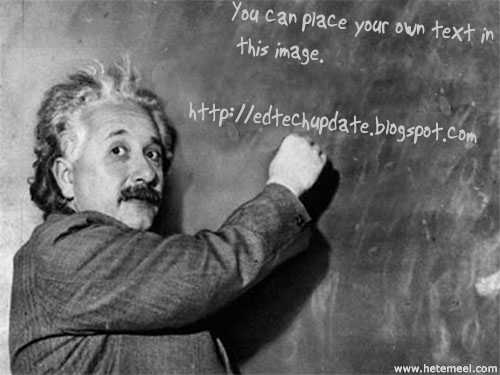
 There are some really fun websites for teachers that will allow you to create dynamic images like these at www.hetemeel.com. (Caution: I wouldn't recommend sending your students there because others have saved some rather "adult" captions on the website)