[Via: Online Schools]
Monday, August 02, 2010
Thursday, June 24, 2010
Monday, May 10, 2010
From tube testing to YouTube
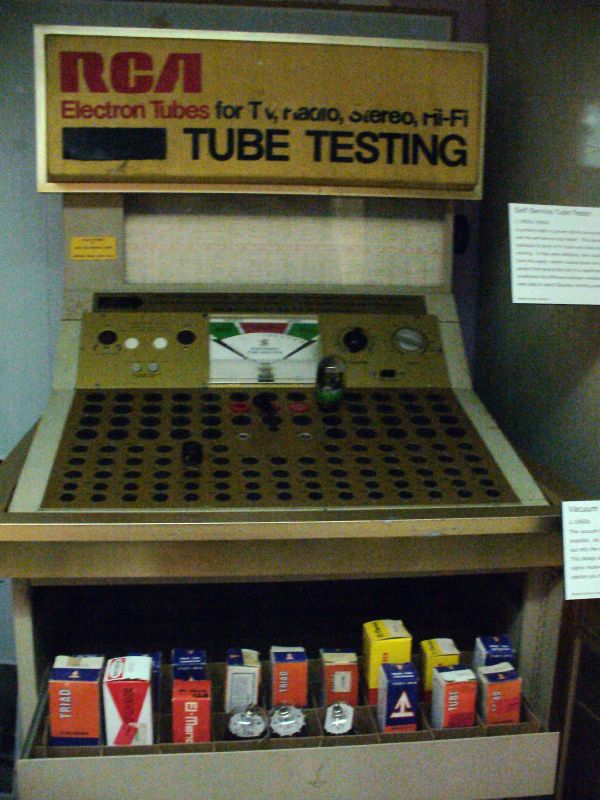
Growing up in the 60's, I was fascinated by the tube testers that seemed to be in every retail store (thank you to Flickr user KB35 for sharing the photo shown here). As I got a little older I finally understood their purpose. Amateur TV and radio repairmen could figure out what was wrong with their equipment by removing and testing the various tubes of all shapes and sizes, and replacing the bad ones. It was an economical way of fixing what was broken without having to fully understand the technology.
Flash forward 40 years or so. I had given my sister our 4 year old Samsung DLP television in January. Over the course of the past few weeks the TV would start making an awful sound after about 30 minutes of viewing. Turning the TV off for awhile would temporarily alleviate the problem, but after another 30 minutes the problem was back.
I Googled the symptoms, and learned that there are only 2 moving parts inside this TV, and most likely the noise was caused by failed bearings inside the color wheel. Next, I was able to find the part number (no thanks at all to Samsung's online chat support), and a vendor in Dayton, Ohio that could have the replacement color wheel in my hands in one day for a grand total of about $120.
On to the next issue: figuring out how to actually take the TV apart and replace the defective part. I was able to find some printable directions with pictures using Google (although I later figured out it was a slightly different procedure for this model DLP). But even better-- I found a series of 5 videos on YouTube created by Hexagontaginal.
Like me, Hexagontaginal was an amateur repairman who found written directions for replacing the color wheel, and at the urging of a friend, he decided to set up a video camera on a tripod and video tape the whole process. Coincidentally, his television was the exact model number as the one I was attempting to repair.
So last Saturday, with my netbook set up next to the DLP, and needing only a phillips head screwdriver, I proceeded to repair my sister's TV as I watched Hexagontaginal repair his. The whole thing took about 90 minutes, and probably saved my sister about $300-$400 from the estimates I read on the internet.
Now I don't claim to understand anything about how DLP TVs work, but just like the amateurs of my childhood years, once I was able to diagnose the problem and find the correct replacement part, I had the satisfaction of a job well done.
So what's the greater lesson learned? Wow! Where to start?!?
Obviously, this is just one more example of what it means to be a "lifelong learner." But more than that, the next thing that comes to mind is having access to, and the ability to find the information I needed. Many people, including our students, have neither through no fault of their own. My sister, although she does use the internet, would not have been able to diagnose the problem, find and order the correct part, and most importantly the installation instructions. And I seriously doubt that anyone without internet access would be able to find the information in a book, or have been able to find the vendor and order the part.
My story is also an example of how the definition of "teacher" has changed in the information age. My teacher certainly didn't have a teaching degree or certificate, nor was he even an expert on the subject matter (as he himself told me during his videos). Our students have found similar teachers outside the classroom walls, whether it's learning a guitar riff, getting to the next level of a video game, or something else they want to know. Classroom teachers and textbooks are no longer a student's best source of information. They already know that! Many teachers, however, do not, or won't admit it.
Most importantly, I think this is a good example of "just in time learning." Kathy Sierra wrote a blog post entitled "Motivated to learn" a few years ago that says what I'm trying to say. I urge you to read it, but here's the takeaway: Give a compelling, personally motivating reason/benefit for the thing you're teaching, before you teach it! and this: Figure out ways to make just-in-case learning feel almost as motivating as just-in-time learning.
Thursday, February 11, 2010
Have you seen MakeUseOf?

We all know how difficult it is to stay current with all of the great, informative websites that are out there on the Interwebs. I use Delicious and Twitter to help me "filter" the best sites from all the rest, and I subscribe to numerous blogs in my quest to find, try, and share the best sites with the teachers I serve.
MakeUseOf.com is one of my favorites.
At least once a day I find something useful, practical, amazing, or just plain FUN! For example, we are contemplating upgrading to Windows 7, and MakeUseOf just published an article on that very topic: What You Need to Know About Windows 7
They also have a growing collection of in-depth PDF Guides on such topics as Photoshop, Twitter, iTunes, online movies, Linux...
And if you could use a laugh, check out their Geeky Fun page of links.
I highly recommend you add MakeUseOf to your Bloglines or other RSS aggregator, and if you are on Twitter you can follow @makeuseof
Tuesday, February 09, 2010
Wednesday, January 13, 2010
SafeShare.TV
I learned about SafeShare.TV from Kelly Tenkely's iLearn Technology blog. YouTube has some outstanding videos, but unfortunately, a lot of other "stuff" that is very inappropriate for school. There are comments that are rude, or obscene, related videos of questionable worth... you get the idea.
SafeShare.TV takes away all of the bad stuff, and creates a unique URL that allows you to safely show your video in class.
Click this link to see a great video of Havasu Falls, and notice that all of the other YouTube content is no longer there to distract your students.
[Video] Havasu Falls Grand Canyon Arizona USA
Now take a look at the same video on YouTube
SafeShare.TV takes away all of the bad stuff, and creates a unique URL that allows you to safely show your video in class.
Click this link to see a great video of Havasu Falls, and notice that all of the other YouTube content is no longer there to distract your students.
[Video] Havasu Falls Grand Canyon Arizona USA
Now take a look at the same video on YouTube
Monday, January 11, 2010
100 Top Learning Tools
This list was created by Jane Hart. She collected data from a number of people about the online tools they use most. Some of these will be familiar to you, others may be just another way of blogging, bookmarking, etc. I'm sure there will be at least a few new "things" for you to check out.
Thursday, November 12, 2009
Great ideas for using a pocket video camera
The Flip video camera has been around for a couple of years now, and it has been imitated by other companies including Kodak and Creative. These pocket video cameras are perfect for classroom use: they are less expensive than a traditional video camera (I got mine for $40 on Dell), they are basically "point and shoot" without a lot of extra buttons and settings, and they transfer video to your computer via a USB port (most DV cameras still use fire wire).
Through my Twitter PLN I learned of a terrific web page by Jennifer Nicholson with lots of resources for using these cameras in the classroom including this PowerPoint with a nice overview of their capabilities:

Through my Twitter PLN I learned of a terrific web page by Jennifer Nicholson with lots of resources for using these cameras in the classroom including this PowerPoint with a nice overview of their capabilities:
Flip Video Short Web
View more presentations from Jennifer Nicholson.
Tuesday, October 20, 2009
Some great advice on Podcasting...
From 2nd graders in Silvia Tolisano's class...
Listen to their podcast, and learn more about their project on their teacher's blog: http://langwitches.org/blog/2009/10/19/we-podcasted-today-so-did-you-learn-anything/#comments
Thursday, October 01, 2009
Automatic Flickr Creative Commons attribution
cc licensed flickr photo shared by dullhunk
Thank you CogDog (aka Alan Levine) for creating the Greasemonkey script that automatically generates embeddable HTML code and/or attribution text that is appropriate for a PowerPoint slide for Creative Commons photos!
If you want to try it for yourself:
1. Install the Firefox browser (if you aren't already using it)
2. Install Greasemonkey
3. Install the Flickr CC Attribution Helper script for Greasemonkey
4. Go to the Flickr Creative Commons and select a photo.
5. Copy the embed code and paste it into your blog or wiki.
Wow! That was easy! Thanks Alan.
Friday, September 25, 2009
Wikiality-- the reality of Wikipedia
Love it or hate it, block it or allow it, Wikipedia isn't going away. Many schools have blocked it because its reliability and validity are in question. Many students rely on it as their first (and perhaps only?) source of information.
I have used Wikipedia many times to find information and links that I have used in several presentations. But as an adult, I know the importance of questioning my sources of information. Many of our students are gullible and would accept any information as fact without bothering to check its accuracy.
Today I came across an excellent lesson plan about Wikipedia on the FactCheckEd website. There are student handouts, suggested activities, background information, and correlations to national standards-- AND this video from the Colbert Report entitled Wikiality:
I have used Wikipedia many times to find information and links that I have used in several presentations. But as an adult, I know the importance of questioning my sources of information. Many of our students are gullible and would accept any information as fact without bothering to check its accuracy.
Today I came across an excellent lesson plan about Wikipedia on the FactCheckEd website. There are student handouts, suggested activities, background information, and correlations to national standards-- AND this video from the Colbert Report entitled Wikiality:
| The Colbert Report | Mon - Thurs 11:30pm / 10:30c | |||
| The Word - Wikiality | ||||
| www.colbertnation.com | ||||
| ||||
I think this is an important lesson and an important topic we need to address with our students.
Tuesday, September 22, 2009
A new way to create a digital story!
Storybird is currently a free site for creating digital stories. Here's a short video from their website that shows you what's possible:
Storybird Quick Tour from Storybird on Vimeo.
Monday, September 14, 2009
Love this preso!
I saw this on the Rainy Day Blog and had to have a copy of it for my own blog. Good stuff!

The e-learning skills gap
View more presentations from Clive Shepherd.
Did You Know? v4.0
Also see the Shift Happens wiki: http://shifthappens.wikispaces.com/versions for downloadable versions of the YouTube video.
Friday, August 21, 2009
Organize your Bloglines feeds
As you accumulate more and more RSS feeds in your Bloglines account, you may wish to organize them by subject or topic. Since I am following over 100 teachers' blogs for an online Web 2.0 class that I facilitate, I created folders for each class. Here's a 1 minute video that shows you how:
Wednesday, August 05, 2009
Love this Twitter visualizer!
Thanks to @coolcatteacher for sharing the link to this picture. Also see the related site: http://www.informationisbeautiful.net/

13 MORE Things: Thing 10- Google Maps
Here's a map that is very helpful for anyone like me who drives around the county from school to school:
View Monroe County Schools in a larger map
Tuesday, August 04, 2009
Subscribe to:
Posts (Atom)